

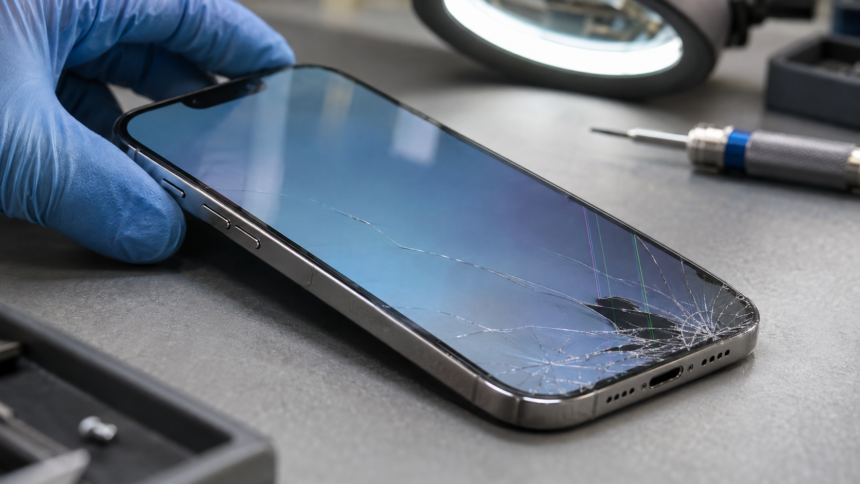
A cracked iPhone screen can look worse than it behaves—or hide faults that are more serious than the visible damage suggests. Understanding the difference between broken glass, display damage and touch problems helps explain why proper diagnosis matters before a repair.
For many iPhone owners, the first thing they check after dropping their phone is the glass. A small crack might seem manageable, while a web of fractures can make the device look beyond repair. Yet appearance alone cannot reveal which components have been affected.
A phone with badly cracked glass may still display a clear picture and respond to touch. Another with only a minor mark might develop coloured lines, dark patches or an unresponsive section of the screen. The visible damage is a starting point for assessment, rather than a complete diagnosis.
What sits beneath the glass?
An iPhone screen system brings together several functions: the outer surface, the display that produces the image, and the touch-sensitive layer that detects user input. These work together within a closely integrated assembly.
Depending on the model, the phone uses an LCD or OLED display. LCD screens rely on a backlight, while OLED displays use pixels that emit their own light. Both can suffer damage from an impact, even when the outer glass remains largely intact.
This is why the size or number of cracks does not reliably indicate the repair required. An assessment needs to consider image quality and touch response alongside the physical condition of the device.
Signs that the damage extends beyond cracked glass
Cracked glass is usually easy to recognise. Other symptoms need more careful interpretation.
Coloured lines: Vertical or horizontal lines appearing after a drop can indicate a display fault. However, the symptom alone does not establish whether the problem lies in the panel, its connection or another component.
Black areas: Dark patches or sections that no longer show an image may indicate damage within the display. Replacing only the outer glass would not address a fault in the underlying panel.
Flickering: A screen that flashes or changes brightness unexpectedly needs investigation, particularly if the behaviour began after an impact. Flickering can have more than one cause, so assuming every case requires the same repair can be misleading.
Touch problems: Missed taps, unresponsive areas or inputs registering without a deliberate touch can make the phone difficult to use even when the picture looks normal. These symptoms should be reported separately from visible cracks.
A completely black screen also needs diagnosis. It does not, by itself, prove that the display is the only faulty component.
Why diagnosis should come before a repair quote
A useful assessment starts with what happened. Was the phone dropped onto a corner? Did the symptoms appear immediately? Had it been exposed to moisture, or repaired previously?
A technician can use this history alongside checks of the glass, frame, image and touch response. A distorted frame may affect how a replacement screen fits, while faults elsewhere in the device may require further investigation.
When considering an iPhone screen repair service from Free Fusion, explain both the visible damage and any changes in how the phone behaves. Details such as intermittent flickering or a keyboard area that stops responding can help communicate the problem more clearly than a photograph alone.
A clear repair recommendation should explain the likely fault, the work proposed and whether further assessment may be needed.
What to do while arranging an assessment
If the phone remains usable and can be handled safely, back up important data before handing it over. Avoid pressing on damaged areas to see whether the picture or touch response changes.
Keep the device away from moisture and avoid picking at loose glass. A screen protector cannot repair the underlying damage, and continued operation does not confirm that the fault is minor.
Note any symptoms that come and go, including when they occur. This can be useful if the screen happens to behave normally during an initial inspection.
Questions worth asking before approving the work
Ask whether the proposed repair addresses the glass, display and touch symptoms you have reported. It is also reasonable to ask about replacement part quality, expected display performance, repair times and warranty terms.
Appropriate replacement part quality matters, but correct fitting and post-repair testing are equally important. After the work, checks should cover image quality and touch response across the screen, alongside relevant functions affected by the repair.
Practical arrangements are another consideration. Free Fusion is an independent UK phone and tablet repair centre established in 2012, based in Corby, Northamptonshire, with local walk-in and UK-wide postal repair services. For a postal repair, confirm packaging instructions and the assessment process before sending the device.
A successful repair begins with understanding the fault. Looking beyond the cracks helps ensure that the proposed work addresses how the phone functions as well as how it looks.
England can reach the Nations League quarter-finals before facing Spain